| 1. | Click the orange ‘add’ button to add a new poll |
| 2. | On the new screen, select the group of users you would like to have access to the quick poll editing and results on the back end. |
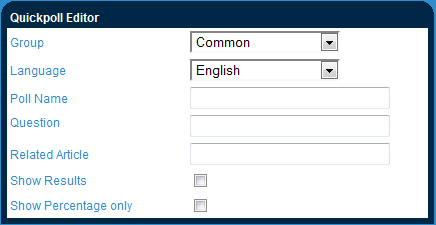
| 3. | Assign your poll with a ‘Poll Name’. This will only be used to identify the poll and will not be seen by users on the site. |
| 4. | Input the the Quickpoll question. |
| 5. | The ‘related article’ field allows you to put in a link which is relevant to the polling question. This can be an external link (in the form http://www.myrelatedlink.com) or as an internal relative link (in the from : /en/RelatedQuestion). |
| 6. | Check off ‘show results’ only if you would like users to be shown the results of the poll upon submitting their vote. |
| 7. | The ‘show percentage only’ button will limit the poll results to percentages (as opposed to actual numbers) for users viewing results after voting. This is only relevant is ‘show results’ is checked off. |
| 8. | Confirm all your quick poll information, then click ‘save’. |
|
